Supervertaler Re-importable Table (DOCX)
The Supervertaler Re-importable Table is a branded Word (DOCX) export that lays your project out as a side-by-side table – handy for reviewing, proofreading, or handing off to someone who doesn’t use a CAT tool. Its defining feature: it can be edited and re-imported to pull the changes straight back into your project. (Its plain-text sibling, Re-importable Text, does the same round-trip in an AI-friendly text format.)
When to use it
- A proofreading round-trip in Word: export, edit the targets, re-import.
- Sharing with a reviewer who doesn’t use your CAT tool.
Columns
| Column | Description |
|---|---|
| # | Segment number |
| Source | Source text |
| Target | Target text (edit this when proofreading) |
| Status | Segment status |
| Comments | Segment comments – edit, add, or clear; changes round-trip on re-import |
A header above the table shows the project name, language pair, segment count, and export date.
Where to find it
Project → Export → 🔁 Supervertaler Re-importable → Bilingual Table (DOCX). Formatting tags stay visible as markup; edit the Target/Comments cells, save, and bring the changes back in (see below). Don’t change the segment numbers (#) or the source text. The document is titled Supervertaler Re-importable Table.
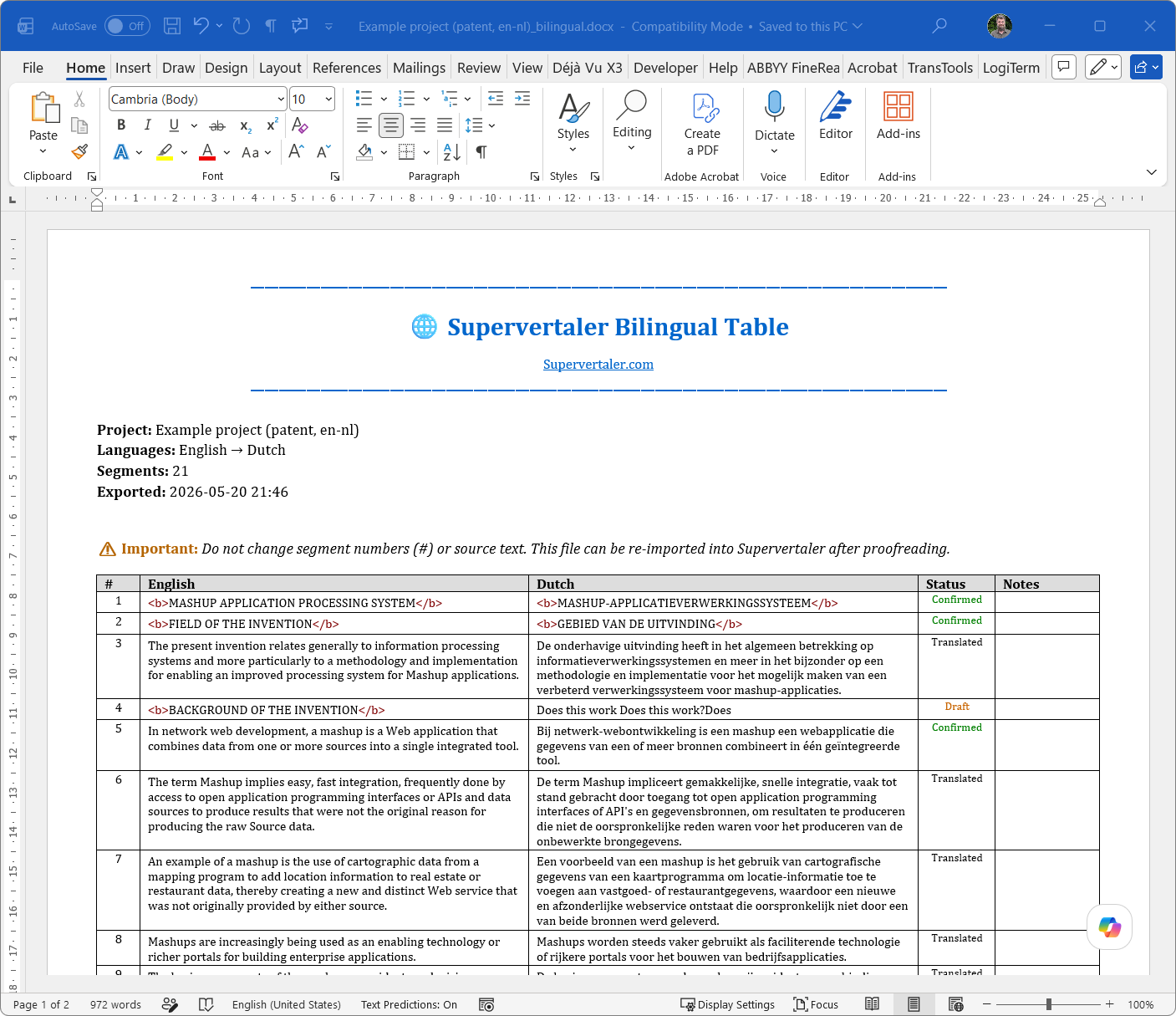
The re-importable Bilingual Table: formatting shown as visible markup, with a notice that segment numbers and source text must stay unchanged so the file can be re-imported after proofreading.
Round-trip (proofread and re-import)
- Export the re-importable Bilingual Table.
- Edit in Word – leave the # and Source columns untouched:
- The Target column for translation edits.
- The Comments column to edit, add, or clear segment comments. New comments added to segments that had none in Workbench are also round-tripped.
- Back in Workbench: Project → Import → 🔁 Supervertaler Re-importable → Bilingual Table (DOCX) – Update Project.
- Supervertaler diffs the file against your project and shows a preview before applying. Target changes set the segment back to “Not Started” so you can re-confirm; comment changes replace the segment’s existing comments verbatim with the proofreader’s text (no
[Review: …]wrapping or appending – round-trip in, round-trip out).
Other bilingual tables
To round-trip back into a CAT tool, use that tool’s own bilingual format (memoQ, CafeTran, Phrase, Trados Bilingual Review) rather than the Supervertaler table – see CAT Tool Overview.