Supervertaler for memoQ
Supervertaler for memoQ brings AI translation and your own terminology into memoQ 11 and 12, as two add-ins that work together.
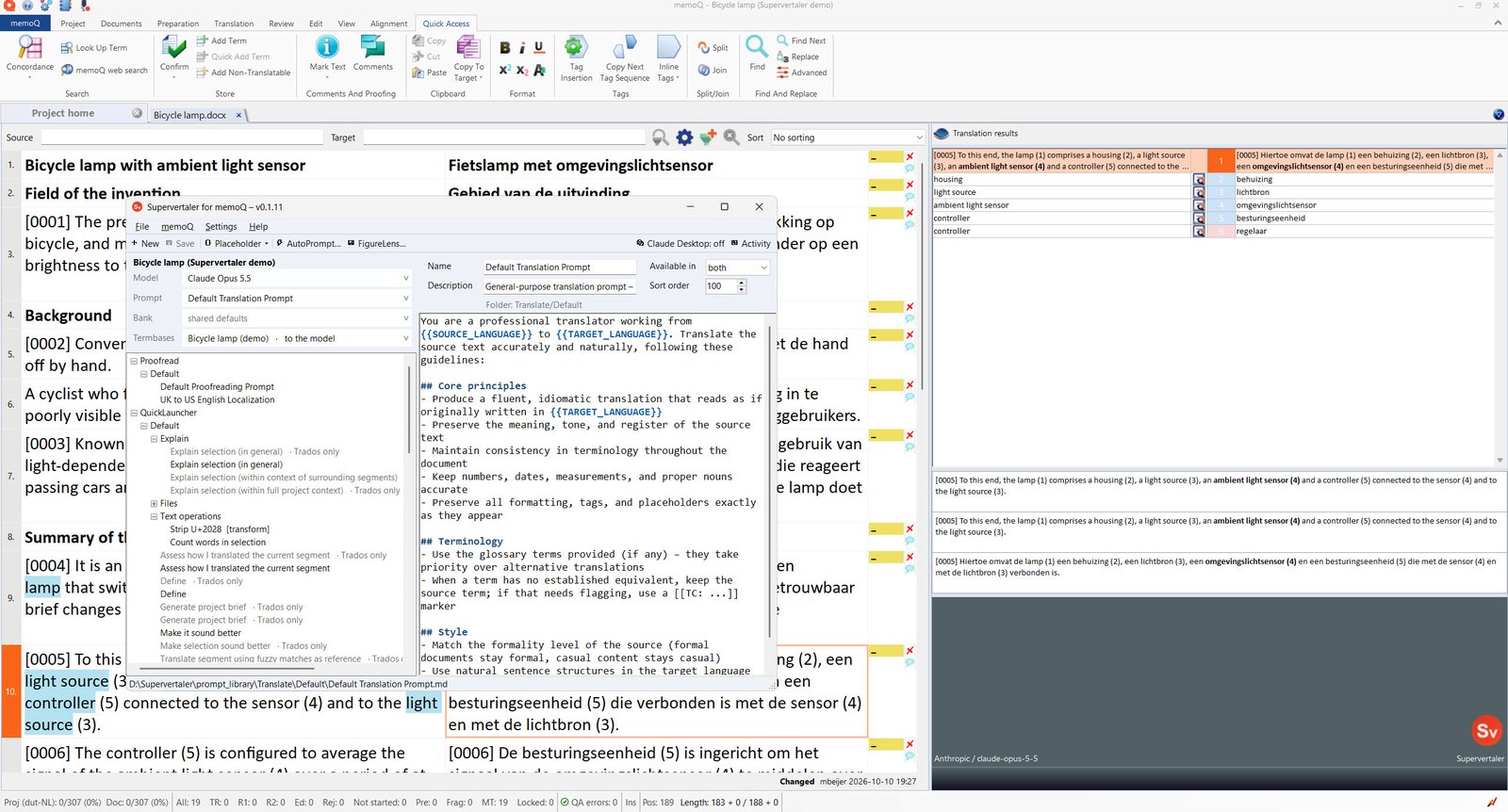
Unlike the Trados plugin, which docks its own panels into the editor, memoQ gives an add-in no window of its own. Supervertaler therefore works through memoQ’s existing surfaces – the machine-translation engine and the terminology pane – rather than adding new ones. In practice that turns out to suit it: the results appear exactly where you already look for them.
What it does
AI translation. An LLM machine-translation engine using Anthropic, OpenAI or Google, with your own API key and your own instructions. It works segment by segment as you translate, and in bulk through Pre-translate. Inline tags survive the round trip.
It learns as you work. Every segment you confirm is remembered, and the most relevant ones are shown to the model when it translates later segments in the same document. Settle on a term once and the rest of the document follows it – no configuration, no retraining, just your own approved choices fed forward. See Self-learning translation.
Your terminology, twice over. Your Supervertaler termbases – shared with Supervertaler for Trados, or made in memoQ from scratch – appear as a memoQ terminology provider, matched terms highlighted in the source and entries listed in Translation results, and the ones you tick for it are sent to the model as required or forbidden terminology. Forbidden terms are enforced, not merely displayed. See Terminology.
Translate with Claude Desktop or ChatGPT. Connect an AI assistant with one button in the editor, and it reads the document you are translating, your confirmed segments and your termbases, and stages translations that flow into the grid when you press Pre-translate. Tokens are billed to your Claude or ChatGPT subscription rather than an API key, and every write into your document goes through your own hands.
A companion editor. Translation instructions come from the same prompt library the Trados plugin uses, chosen and edited in the Supervertaler editor – which is also where you pick the memory bank and termbases for a job, draft a prompt with AutoPrompt and watch what the plugin is doing.
One licence for both products. The Supervertaler licence covers Supervertaler for Trados and Supervertaler for memoQ, with a 14-day free trial. See Licensing.
What it does not do
memoQ does not let a plugin read its own term bases or translation memories, so terms defined in a memoQ term base are not visible to the AI. Supervertaler reads its own termbases instead, which it also displays alongside memoQ’s own term base hits.
There is no chat panel and no document-wide search inside memoQ: a plugin can answer when asked for a translation, and that is all. The chat lives in Claude Desktop or ChatGPT; the prompt library lives in its own editor; and an assistant’s translations reach the grid only when you Pre-translate. memoQ and Trados compared lists every difference from the Trados plugin in one table, with what to do in memoQ instead.
Where to start
- Installation – the installer, and switching it on in memoQ
- Getting started – a first translation
- Licensing – the trial, and one licence for both products
- Terminology – termbases, shared with Supervertaler for Trados
- AI assistants – translating with Claude Desktop or ChatGPT
- memoQ and Trados compared – what each plugin can and cannot do
- The Supervertaler editor – prompts, memory banks, AutoPrompt and FigureLens