TermPicker
TermPicker shows all matched terms for the current segment as a sortable, keyboard-navigable list. It is useful when TermLens shows many matches and you want a quick overview without scrolling – and it is available either as a popup at your cursor or as a permanently docked pane.
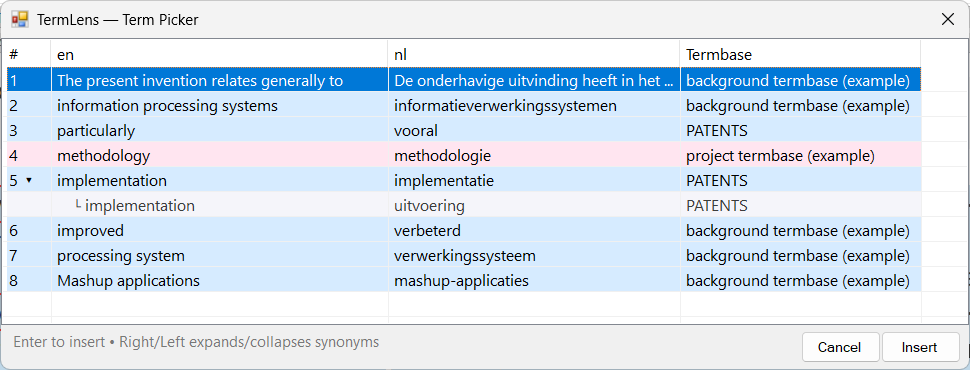
TermPicker with all matched terms for the current segment
Two views, two placements
TermLens and TermPicker are sibling surfaces: both show the terminology matches for the current segment, drawn from the same termbases, but they present them differently. Each is available in both placements, so you can choose the view you prefer independently of where you want it:
| Docked pane | Popup at the cursor | |
|---|---|---|
| TermLens | TermLens panel | tap Ctrl |
| TermPicker | TermPicker pane | Alt+P |
- TermLens shows matches in context – the source sentence with terms highlighted in place. Best for reading and scanning.
- TermPicker shows the same matches as a flat sortable list. Best for quick insertion and for seeing every synonym at once.
Opening TermPicker
As a popup: press Alt+P. It appears above the editor with every synonym group already expanded, so you can see all alternatives at a glance. Escape closes it.
As a docked pane: open it from Studio’s View tab → TermPicker. The pane stays visible and updates as you move through the document, in step with the TermLens panel. Drag it wherever suits you – Studio remembers the position. A layout that works well is the Translation Results window at the top right with the TermPicker pane directly below it.
Colour-coded rows
Each row in TermPicker is colour-coded by termbase type:
| Colour | Meaning |
|---|---|
| Pink | Project termbase term |
| Blue | Regular Supervertaler termbase term |
| Yellow | Non-translatable term |
| Green | MultiTerm termbase term (.sdltb) |
This lets you instantly see where each term comes from and how it should be handled.
The details dot
An amber dot in the second column marks terms that carry extra information – a definition, domain, notes or a URL. Press I on such a row to see it (see below). Rows without a dot have nothing further to show, so you never have to guess. This mirrors the dot on the TermLens chips.
Expandable synonyms
Terms with multiple translations open already expanded, with their alternatives listed as sub-rows beneath the term, so nothing is hidden behind a marker. Press Left arrow to collapse a group (the indicator changes to ▸) and Right arrow to expand it again.
Keyboard navigation
TermPicker is designed for fast keyboard use, and the keys are identical in the popup and the pane:
| Key | Action |
|---|---|
| Up / Down | Navigate between rows (wraps around) |
| Right | Expand synonyms for the selected term |
| Left | Collapse synonyms |
| 0-9 | Jump directly to that term number |
| I | Show the term’s details – definition, domain, notes, URL, synonyms |
| E | Open the term editor for the selected term |
| Enter | Insert the selected term |
| Escape | Close the popup without inserting |
Navigation wraps around: pressing Down on the last row jumps to the first, and Up on the first jumps to the last.
Term details (I)
Pressing I on a row opens a small window just below it showing everything the termbase holds for that term: its synonyms, definition, domain, notes and URL, for every entry behind the row. Press I again – or Escape – to dismiss it. It also closes by itself when you move to another row, so it can never describe the wrong term.
Right-click menu
Right-clicking a row gives you the same three actions as right-clicking a TermLens chip:
| Action | Effect |
|---|---|
| Edit Term… | Opens the term editor (also E) |
| Mark as Non-Translatable | Flags the term so source = target (or removes the flag) |
| Delete Term | Removes the term from the termbase, after a confirmation |
MultiTerm terms are read-only in Supervertaler, so these actions are greyed out for them – edit those in Trados’s own MultiTerm interface.
Inserting a term
You can insert a term in two ways:
- Double-click any row to insert that term at the cursor position in the target field
- Press Enter on the selected row
From the popup, inserting also closes it; from the docked pane, the list stays open so you can insert several terms in a row.
Like the TermLens chips, the picker displays and inserts terms with the capitalisation of the segment occurrence (the first occurrence when a term appears more than once) rather than the stored capitalisation – see Adapt term capitalisation.