Supervertaler Sidekick
Supervertaler Sidekick is the system-wide toolbox for translators. Where Supervertaler for Trados and Supervertaler for memoQ work inside your CAT tool, Sidekick works everywhere else – and inside the CAT tool too.
Select text in any Windows application – a CAT tool, a browser, a PDF, an email, a chat window – press ` (backtick), and act on it: look it up across a dozen terminology sources, translate it with several engines at once, run an AI prompt over it, change its case, wrap it in quotes, or paste a snippet in its place.
It is free and open source, and it needs no account. The source is at github.com/Supervertaler/Supervertaler-Sidekick.
What it does
One window. ` opens your clipboard history and the menu side by side. Arrow keys cross between them, folders open and close, and typing filters both panes at once. See The window and the palette.
The palette. Ctrl+Alt+Space puts one search box over everything – clipboard history, snippets, searches, AI prompts, bookmarks and conversions. Type a few letters, press Enter.
Clipboard history. Searchable, survives restarts, and pastes straight back into the window you came from. Entries you have already used are ticked and greyed, so you can work down a list of terms without losing your place. See Clipboard history.
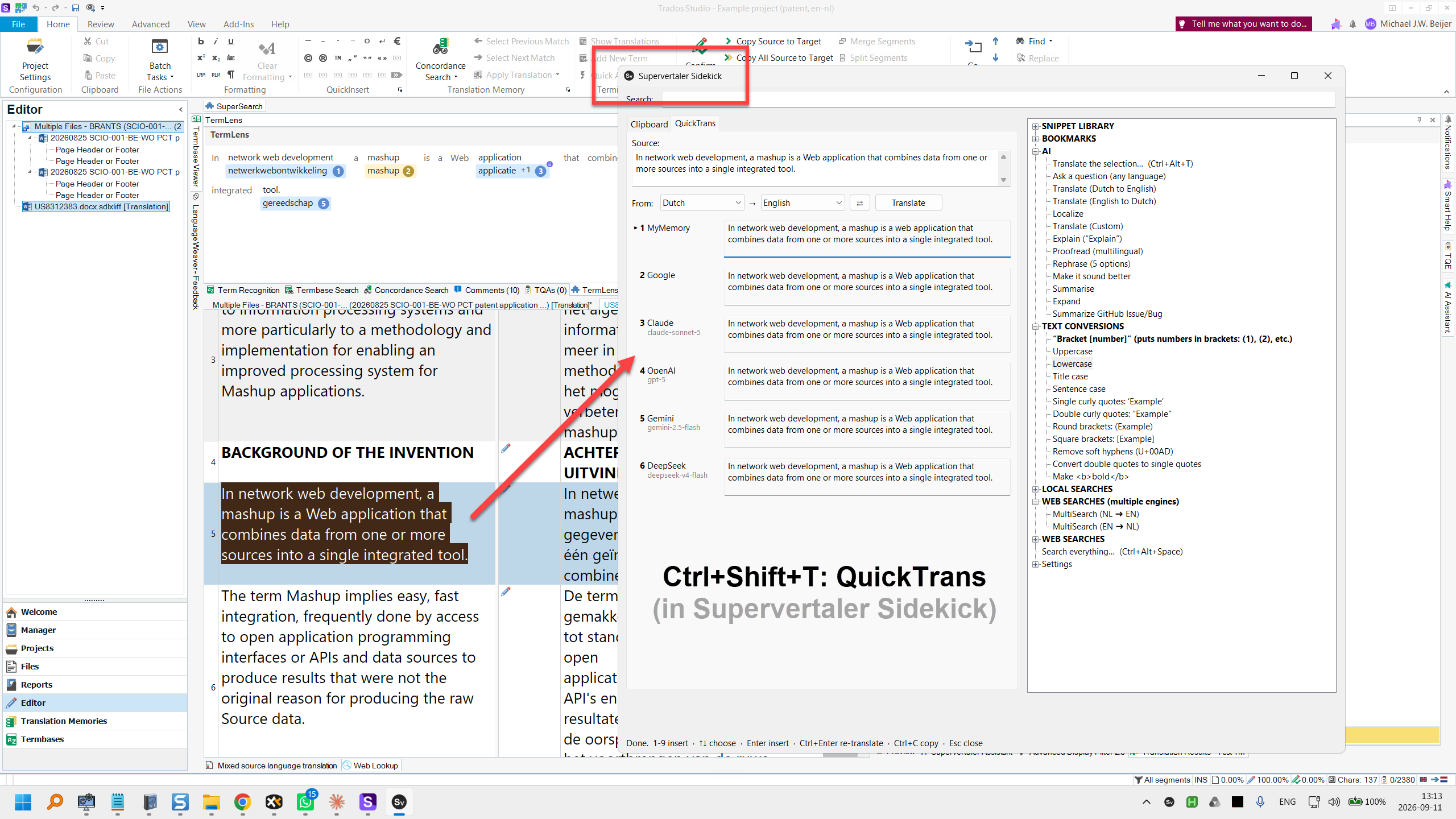
QuickTrans. The selection translated by several engines at once – MyMemory, Google, Microsoft, ModernMT and DeepL for machine translation; Claude, OpenAI, Gemini, Mistral, DeepSeek, OpenRouter, a local Ollama or any OpenAI-compatible endpoint for LLMs. Press a number to insert the one you like. See QuickTrans.
AI actions. Any prompt over the selection: translate, proofread, rephrase, summarise, expand, localise, explain. Every prompt is yours to edit. See AI actions.
Web and local searches. Select a term, pick a source – IATE, Juremy, JurLex, Van Dale, Linguee, ProZ, Reverso, BabelNet, Wikipedia, Wiktionary, Google Patents and more, or a whole batch at once in a fresh browser window. Every source follows the language pair you set, so one entry serves every direction, and a language pack adds everything for your pair in one click. See Web and local searches.
Snippets, bookmarks and text conversions. Boilerplate, standard replies, special characters and regex patterns inserted at the cursor; sites and folders you keep reopening; upper, lower, title and sentence case, curly quotes, brackets, HTML bold. See Snippets, bookmarks and conversions.
Text expansion. Type an abbreviation, get the full text – thousands of entries with no cost per keystroke. See Text expansion.
Keyboard shortcuts that fit your hands. Every built-in key can be changed, given a second key or limited to one program, and you can attach a key to anything the menu does. A key can even be a double tap of Ctrl. See Keyboard shortcuts.
Who it is for
Anyone who translates and would rather not leave the window they are working in. Set your language pair once and the searches, the batch lookup and QuickTrans all follow it. The sources for your pair come as a language pack, one click to install – Dutch ⇄ English so far; every source is one editable entry, and a pack for another pair is one small file.
Sidekick is built in AutoHotkey v2. Nothing personal lives in the program: your snippets, bookmarks, prompts and keys stay in a data folder on your own machine.
Where to start
- Installation – AutoHotkey, the download, and API keys
- The window and the palette – the two ways in
- Clipboard history – the feature you will use most
- Settings and files – where everything lives